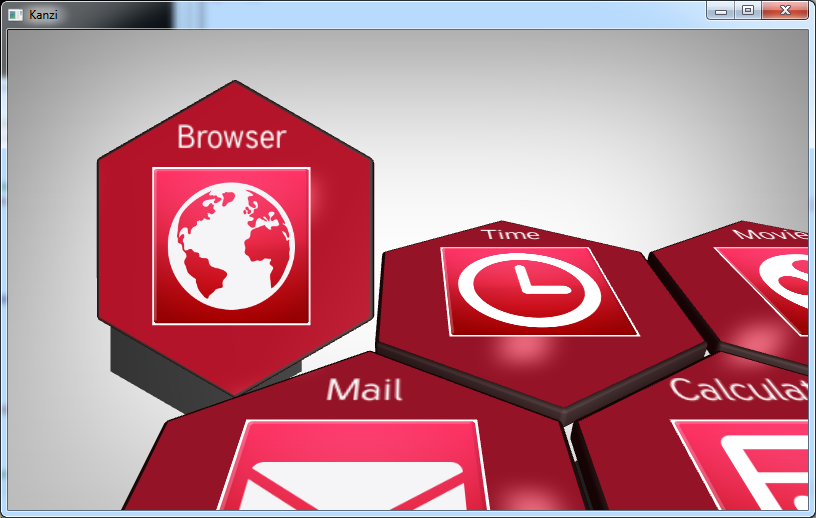
KzaApplicationProperties.onProjectLoaded callback implementation, after loading the prefab instances.The message dispatcher calls the
clickEventHandler whenever the gridListboxNode receives a message of type KZU_MESSAGE_LIST_BOX_ITEM_SELECTED.
/* Apply animation when clicking on an object. */
{
    /* Get the message dispatcher from the project. */
    struct KzuMessageDispatcher* messageDispatcher = kzuUIDomainGetMessageDispatcher(uiDomain);

    /* Add a message handler for click events to the parent object. */
    /* The second argument (parentNode) defines the node in which the message will be intercepted, */
    /* while the fourth argument (KZ_NULL) defines the source from where the message originates. */
    /* By setting this argument to KZ_NULL, all messages of type KZU_MESSAGE_CLICK will be intercepted from any of the child nodes. */
    result = kzuMessageDispatcherAddHandler(messageDispatcher, applicationData->widgetGridListboxNode,
                                            KZU_MESSAGE_LIST_BOX_ITEM_SELECTED, KZ_NULL, clickEventHandler, application);
    ...
KZ_CALLBACK kzsError projectLoaded(struct KzaApplication* application)
{
    ...
    /* Get the reference to the camera object node, which will be animated. */
    applicationData->cameraObjectNode = kzuObjectNodeGetRelative(screenNode, "#Camera");

    /* Get the reference to the target animation object node. */
    applicationData->animationTargetObjectNode = kzuObjectNodeGetRelative(screenNode, "#Animation target");
    ...
    /* Apply animation when clicking on an object. */
    {
        ...
        /* Get the animation target node's initial position. */
        /* The full transformation will consist of this and the target objects translation. */
        applicationData->cameraTransformationTarget = kzuObjectNodeGetTransformation(applicationData->animationTargetObjectNode);
    }
    ...
clickEventHandler implementation gets references to the project assets and the two transformations mentioned earlier through the application data. The selected widget item is queried from the KZU_MESSAGE_LIST_BOX_ITEM_SELECTED message using kzuMessageGetIntArgumentDefault with KZU_MESSAGE_ARGUMENT__LIST_BOX__SELECTION fixed property type as an argument.
/* Event handler for selecting a widget from the widget list. */
KZ_CALLBACK static kzsError clickEventHandler(struct KzuMessage* message, void* userData)
{
    /* Retrieve the application data from the userData argument. */
    kzsError result;
    struct KzaApplication* application = (struct KzaApplication*)userData;
    struct ApplicationData* applicationData = (struct ApplicationData*)kzaApplicationGetUserData(application);
    struct KzuUiListBox* listBox = kzuUiListBoxFromUiComponentNode(kzuUiComponentNodeFromObjectNode(applicationData->widgetGridListboxNode));
    struct KzuObjectNode* sourceNode;
    kzsAssert(kzcIsValidPointer(applicationData));

    /* Get the selected item from the message. */
    {
        /* Get the index of the item that was selected from the list box. */
        kzInt selectedItem = kzuMessageGetIntArgumentDefault(message, KZU_MESSAGE_ARGUMENT__LIST_BOX__SELECTION);
        kzsAssert(selectedItem >= 0);

        /* Get the object node that corresponds to the selected item. */
        result = kzuUiListBoxGetObject(listBox, (kzUint)selectedItem, &sourceNode);
        kzsErrorForward(result);

        /* Store the currently selected object so that you can reset its position later. */
        applicationData->currentlySelectedObject = sourceNode;
}Animation target node for camera defined in the Kanzi Studio project and its transformation are stored in application data. Now the stored camera transformation is updated with the selected widget item’s translation.
KZ_CALLBACK static kzsError clickEventHandler(struct KzuMessage* message, void* userData)
{
    ...
    /* Calculate a new value for the camera animation target node. */
    {
        struct KzcMatrix4x4 transformationTarget;
        struct KzcMatrix4x4 objectOfInterestTransformation;

        /* Get the current transformation. */
        kzuObjectNodeGetFinalTransformation(sourceNode, &objectOfInterestTransformation);

        /* Get the camera's relative transformation target position. */
        kzcMatrix4x4Copy(&applicationData->cameraTransformationTarget, &transformationTarget);

        /* Add the position of the object of interest to the target camera transformation. */
        transformationTarget.data[KZC_MATRIX4X4_INDEX_TRANSLATION_X]
                                 += objectOfInterestTransformation.data[KZC_MATRIX4X4_INDEX_TRANSLATION_X];
        transformationTarget.data[KZC_MATRIX4X4_INDEX_TRANSLATION_Y]
                                 += objectOfInterestTransformation.data[KZC_MATRIX4X4_INDEX_TRANSLATION_Y];
        transformationTarget.data[KZC_MATRIX4X4_INDEX_TRANSLATION_Z]
                                 += objectOfInterestTransformation.data[KZC_MATRIX4X4_INDEX_TRANSLATION_Z];

        /* Apply target transformation to the animation target object node. */
        kzuObjectNodeSetTransformation(applicationData->animationTargetObjectNode, &transformationTarget);
        kzsErrorForward(result);
}The third parameter in the
kzuObjectNodeAddAnimationItem function call defines if the animation should be played in reverse, the fourth how many times the animation will be played and the fifth parameter an optional reference to a KzuTimeLineEntry which can be useful for managing animation clips during animations, which you do not use in this tutorial.
KZ_CALLBACK kzsError projectLoaded(struct KzaApplication* application)
{
    ...
    /* Get the reference to the target animation. This will be used for animating the camera to and from the highlighted application. */
    result = kzuObjectNodeAcquireAnimationItem(screenNode, "Camera Target Animation", &applicationData->targetAnimationClip);
    kzsErrorForward(result);

    /* Get the reference to the highlight animation. This will be used for highlighting the selected app in the list. */
    result = kzuObjectNodeAcquireAnimationItem(screenNode, "Widget Highlight Animation", &applicationData->highlightAnimationClip);
    kzsErrorForward(result);
    ...

KZ_CALLBACK static kzsError clickEventHandler(struct KzuMessage* message, void* userData)
{
    ...
    /* Start the animation. */
    {
        /* Instantiate the animation for the camera. */
        result = kzuObjectNodeAddAnimationItem(applicationData->cameraObjectNode, applicationData->targetAnimationClip,
                                               KZ_FALSE, 1, KZ_NULL);
        kzsErrorForward(result);

        /* Instantiate the animation for widget highlighting. */
        result = kzuObjectNodeAddAnimationItem(sourceNode, applicationData->highlightAnimationClip, KZ_FALSE, 1, KZ_NULL);
        kzsErrorForward(result);
    }
...